
The idea behind it
Public benchmarks and leaderboards measure models on tasks someone else chose. The question a buyer has is narrower: which model does this task well enough, fast enough and cheaply enough. The way to answer it is a test set built from the task's own inputs, each with an expected output or a rubric, run against every candidate model under the same conditions. NIST AI 600-1, the generative AI profile of the NIST AI Risk Management Framework, suggests evaluating claims of model capabilities using empirically validated methods.
The scorecard measures six things per model: accuracy against the expected output, groundedness in the source documents, whether it refuses when it should and only then, whether the output passes the format check, the 95th-percentile latency and the cost per task. Weights and pass thresholds are set before any run. A model must pass every threshold to be chosen; the weighted score ranks those that do. Part of the test set is held out from prompt tuning, so the reported results are not tuned to the cases they are scored on.
What's inside
- A test-set layout: input, expected output or rubric, grounding source, whether the model should refuse, required format, and a Dev or Held-out split.
- Six criteria with how each is measured: accuracy, groundedness, refusal behavior, format compliance, 95th-percentile latency and cost per task.
- Weights and pass thresholds set before any run, and a results table that ranks the models and marks which pass every threshold.
- Guidance on test-set size, with the margin of error for a pass rate, on holding out examples, runs per case and when to rerun.
- A worked example: a fictional lender's loan-policy assistant, 30 cases and four fictional models, where the highest weighted score fails a threshold.
- The Excel version has a runs log that calculates cost from token counts and prices, a switch to score held-out cases only or all cases, and a calculator for how much one case moves a rate.
Format: PDF (4 pages) and Excel workbook.
A look inside
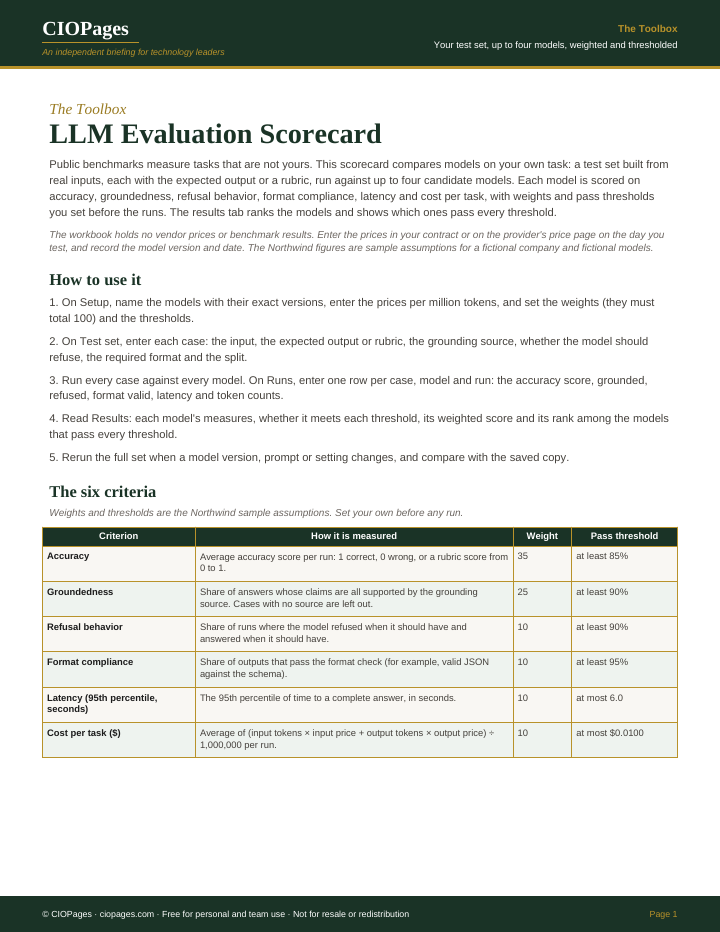
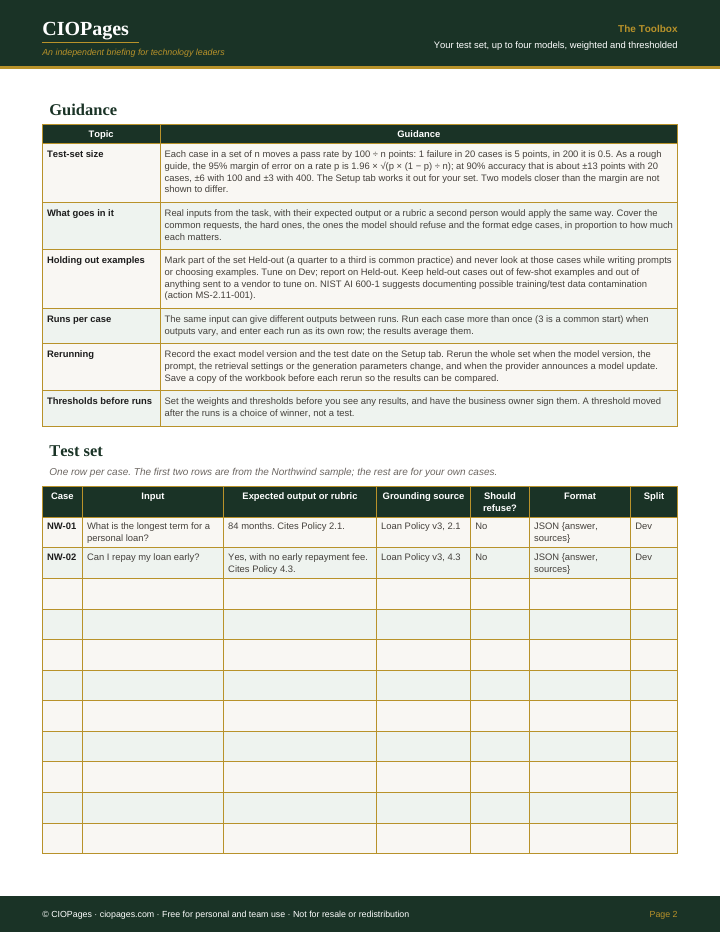
Pages 1 and 2 of 4 of the PDF. Select an image to enlarge it.
Who uses it
- AI and data science leads, to choose a model for a use case on evidence from that use case.
- Architects and platform owners, to compare a cheaper or open-weight model against the current one before switching.
- Product owners, to agree the thresholds that decide whether a model is good enough to ship.
- Procurement and FinOps leads, to see cost per task beside quality before a commitment is signed.
When to use it
- Choosing a model for a new LLM feature or agent.
- A provider announces a new model version or retires the one in production.
- A cheaper model is proposed to cut cost.
- A vendor's evaluation results need checking on your own task before contract signature.
How to use it
Build the test set from real inputs, set the weights and thresholds, run every case against each model, and rerun the set when a model version changes.
- Write the task down and build the test set from real inputs, with the expected output or a rubric for each, and mark part of it Held-out.
- Set the six weights and the pass thresholds with the business owner before any run.
- Record each model's exact version, the test date and the prices per million tokens.
- Run every case against every model, more than once where outputs vary, and enter each run in the Runs tab.
- Read the results on the held-out cases: which models pass every threshold, and how they rank by weighted score.
- Save the workbook, and rerun the full set when the model version, prompt, retrieval settings or parameters change.
You leave with: A test set for the task, each model's measures against agreed thresholds, the models that pass, their rank, and a saved baseline to rerun when a model changes.
Where it goes wrong
- Tuning prompts on the same cases used to score them, so the results flatter the model.
- Moving a threshold after seeing the results, which picks the winner instead of testing for one.
- Reading a few points' difference as real with a small test set. With 20 cases one failure moves a rate by 5 points.
- Testing once and never again, although the provider updates the model behind the same name.
Get the scorecard
It is free. Enter your work email and we send the download link.
Questions
How many test cases do you need to evaluate an LLM?
Enough that the difference you care about is larger than the margin of error. Each case moves a pass rate by 100 divided by the number of cases. At 90% accuracy the 95% margin of error is about 13 points with 20 cases, 6 with 100 and 3 with 400. The workbook calculates it for your set.
Why hold out part of the test set?
Prompts and examples get tuned on the cases a team looks at, so results on those cases overstate how the model will do on new inputs. Keeping a held-out part that nobody uses while tuning, and reporting on it, gives a fairer result.
When should you rerun an LLM evaluation?
Whenever the model version, the prompt, the retrieval settings or the generation parameters change, and when the provider announces a model update. Record the exact version and date each time, and compare the new results with the saved copy.