
The idea behind it
Cognitive load is the amount of mental effort a task demands of working memory. The psychologist John Sweller developed cognitive load theory in the 1980s to explain why some instruction overwhelms learners. He separated intrinsic load, which comes from the task itself, from extraneous load, which comes from how the task is presented or surrounded. Matthew Skelton and Manuel Pais applied the idea to software teams in Team Topologies. Their argument is that a team can only hold so much in its head at once, so the size and number of domains a team owns should be limited to what it can understand well.
When a team carries too much, the symptoms are slow delivery, more defects, more incidents and people leaving. These rarely show up in a budget or a headcount plan, so they are easy to miss until a team is already struggling. The usual fixes are structural: move a service to another team, have a platform team absorb shared tooling, cut concurrent projects, or split the team along domain lines. An assessment gives managers a common scale so that the decision to add work, or take it away, rests on the team's situation rather than on who complains loudest.
What's inside
- Fifteen questions in five dimensions: domain complexity, services owned, operational burden, context switching and toolchain complexity.
- A scoring guide for each question, at 1, 3 or 5 points.
- Score bands with an action for each: under 40 healthy, 40 to 59 elevated, 60 to 75 critical.
- A worked example: a payments platform team of six engineers that scores 51.
- An Excel version with a dropdown for each answer, a score for each, and the total and status once all fifteen are answered.
Format: PDF (3 pages) and Excel workbook.
A look inside
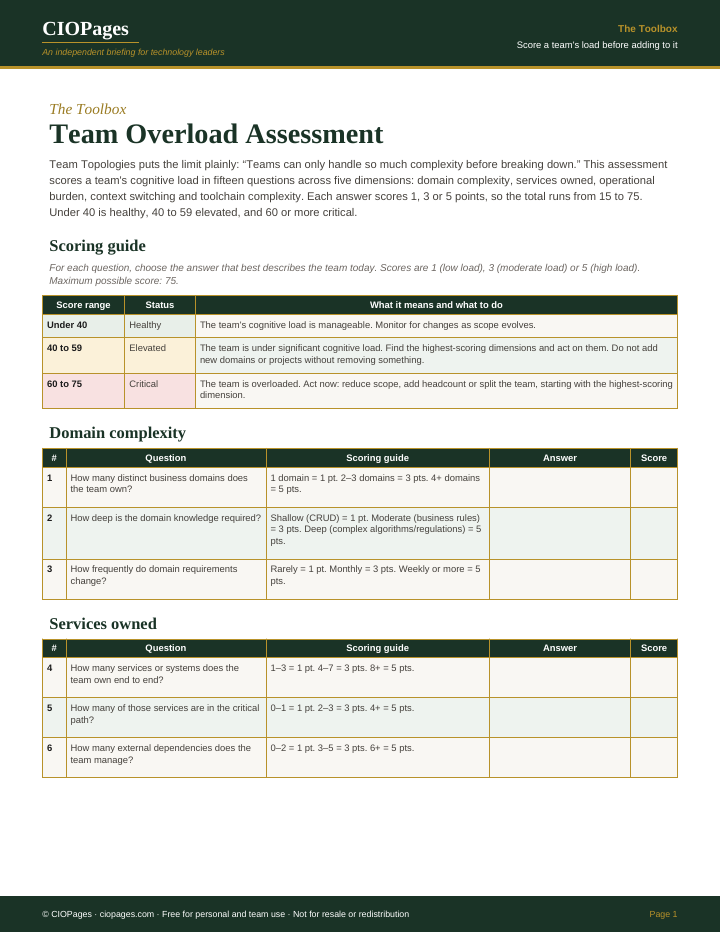
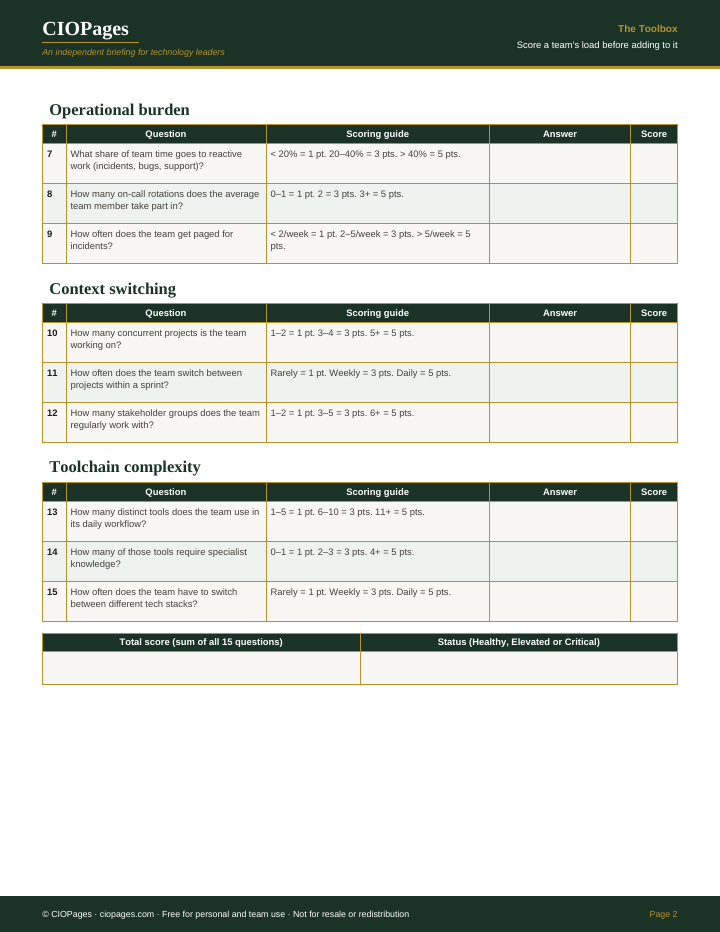
Pages 1 and 2 of 3 of the PDF. Select an image to enlarge it.
Who uses it
- Engineering managers, to show with a score why their team cannot take on another service without giving one up.
- Heads of IT and CIOs, to compare teams before assigning new projects or reorganizing.
- Platform engineering leads, to find which toolchain and operational work a platform could take off product teams.
- Team leads, to start a retrospective on workload with questions the whole team can answer.
When to use it
- A team is about to be handed another service, system or project.
- A reorganization or a move to product-aligned teams is being planned.
- Incidents, missed sprint goals or resignations rise in one team.
- A team has inherited services from a team that was disbanded.
- An annual or semiannual team health review.
How to use it
Score a team before handing it another service or project. The highest-scoring dimensions show what to take away first.
- Answer the fifteen questions with the team, using current figures where they exist, such as page counts, the share of time on reactive work and the number of services owned.
- In the Excel version, pick each answer from the dropdown in the Answer column on the Cognitive Load Assessment sheet. The Score column fills in 1, 3 or 5.
- Read the total and status at the bottom once all fifteen questions are answered: under 40 is healthy, 40 to 59 elevated, 60 to 75 critical.
- Find the dimensions with the highest scores among domain complexity, services owned, operational burden, context switching and toolchain complexity.
- Pick the action for the band from the scoring guide, aimed at the highest-scoring dimension, and compare with the Payments Platform worked example.
- Score the team again after the change, or before the next piece of work is assigned to it.
You leave with: A score out of 75 for one team, its status band, and the dimensions driving it, which point to what to take away or hold back first.
Where it goes wrong
- Having a manager score the team alone. The questions on context switching and tooling are better answered by the people doing the work.
- Skipping a question because nobody has the figure. The Excel version shows no total until all fifteen are answered, so estimate the figure with the team.
- Reading only the total. Two teams at 50 can have very different causes, and the fix depends on which dimension is high.
- Responding to a critical score by adding headcount alone, without reducing the domains or projects that caused it.
Get the assessment
It is free. Enter your work email and we send the download link.
Questions
What is cognitive load in software teams?
It is the total mental effort a team must spend to understand and run what it owns: its domains, services, on-call duties, tools and concurrent projects. The term comes from John Sweller's cognitive load theory. Team Topologies applied it to how team responsibilities are sized.
How do you measure a team's cognitive load?
There is no single standard measure. Most approaches combine counts, such as services owned, projects in flight and pages per week, with the team's own judgment of how hard its domains and tools are. This assessment scores fifteen such questions at 1, 3 or 5 points and bands the total.
How do you reduce cognitive load on an IT team?
Remove work rather than adding people. Common moves are handing a service to another team, having a platform team take on shared tooling and infrastructure, cutting concurrent projects, and reducing reactive work through better observability and runbooks. Splitting a team along domain lines is the larger option.