
The idea behind it
A business capability is something the business does, described by what it achieves rather than by who does it, how, or with which system. Because capabilities change less often than org charts, processes and applications, a capability map gives strategy, architecture and investment discussions a stable frame. Level 1 names the broad areas, such as Finance or Order Fulfillment. Level 2 breaks each into the capabilities a leader can own and score, such as Accounts Payable or Demand Planning.
A map becomes useful when it is scored. This template uses three lenses. Strategic importance shows which capabilities differentiate the business. Maturity shows how well each one runs today. Application coverage shows whether software supports it, partly supports it, or supports it twice. Laid over the map as heat maps, the three show where investment should go. Capabilities with high importance and low maturity are the priority gaps, and overlapping coverage points to candidates for application rationalization. A map that mixes processes, departments and systems cannot be scored consistently, so the template includes naming rules.
What's inside
- A starting map of 12 Level 1 and 51 Level 2 capabilities for a generic enterprise, each Level 2 with a one-line description.
- Rules for naming capabilities as nouns, not processes, org units, systems or projects, with six names to fix.
- Scales for strategic importance (1 to 5), maturity (1 to 5) and application coverage (none, partial, full, overlapping).
- An Excel Map View with four heat maps that recolor as the scores change: importance, maturity, coverage and the gap between importance and maturity.
- PowerPoint slides of the map and the four heat maps, colored from the workbook's worked example.
- A list of priority gaps: capabilities with high importance and low maturity.
- A worked example for a fictional distributor.
Format: PDF (7 pages), Excel workbook and PowerPoint file.
A look inside
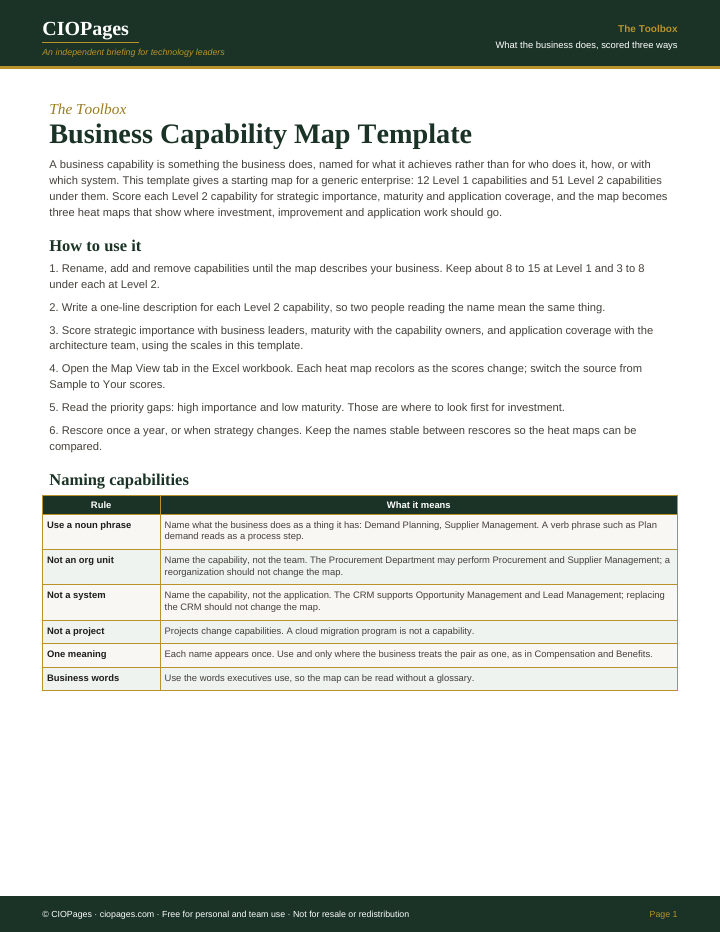
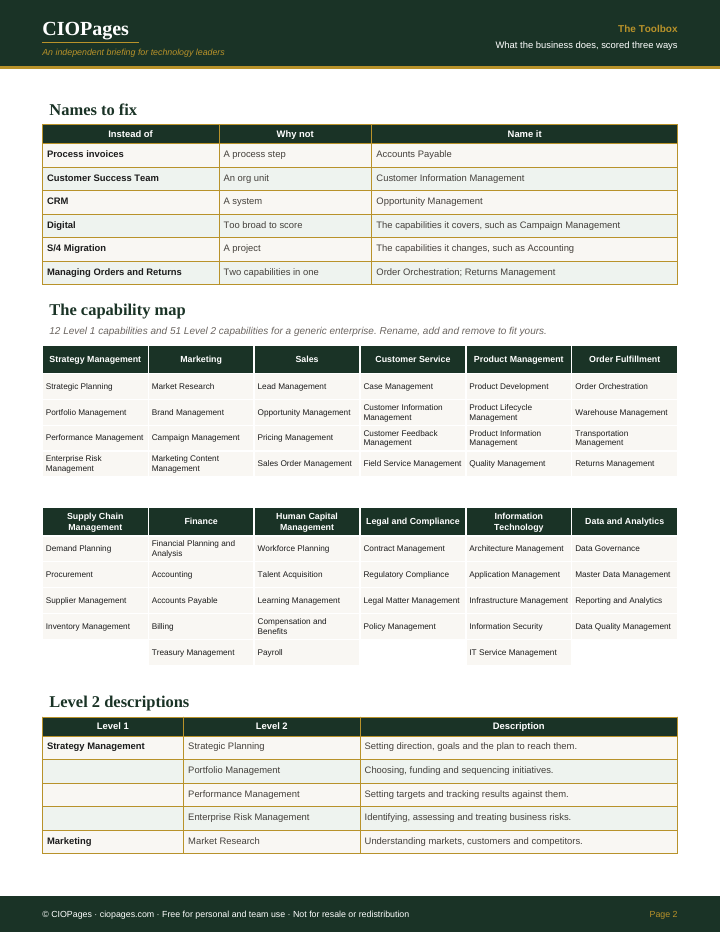
Pages 1 and 2 of 7 of the PDF. Select an image to enlarge it.
Who uses it
- Enterprise and business architects, to build a capability map the business recognizes and keep it stable between rescores.
- CIOs and strategy leads, to show where investment should go in terms executives use.
- Application portfolio managers, to find capabilities with no application support or with overlapping applications.
When to use it
- An investment plan or technology roadmap needs to be tied to what the business does.
- Application rationalization needs a way to see overlaps by capability.
- A merger, reorganization or ERP program needs a frame that does not depend on today's org chart or systems.
- Executives disagree about where the business most needs improvement.
How to use it
Adapt the names to your business, score each Level 2 capability with its owners, and use the heat maps to decide where investment and application work go first.
- Rename, add and remove capabilities until the map describes your business, keeping 8 to 15 at Level 1 and 3 to 8 under each at Level 2.
- Check every name against the naming rules and write a one-line description for each Level 2 capability.
- Score strategic importance with business leaders, maturity with capability owners and application coverage with the architecture team.
- Switch the Map View source to Your scores and read the four heat maps.
- List the priority gaps and the overlapping coverage, and take them to the investment discussion.
- Rescore yearly with the names unchanged so the heat maps can be compared.
You leave with: A named and described capability map, four heat maps scored by the people who own each capability, and a short list of priority gaps for investment.
Where it goes wrong
- Naming capabilities after departments or systems, so the map changes at every reorganization or replacement.
- Mixing processes into the map. Process invoices is a step; Accounts Payable is the capability.
- Scoring everything as important, which leaves no priority. A 5 means differentiating, not necessary.
- Building a map with hundreds of capabilities before anyone has used the first two levels.
Get the template
It is free. Enter your work email and we send the download link.
Questions
How should business capabilities be named?
As noun phrases for what the business does, such as Demand Planning or Supplier Management. Not as a process step (Plan demand), an org unit (Procurement Department), a system (the CRM) or a project (S/4 Migration).
How many levels should a capability map have?
Start with two. This template has 12 at Level 1 and 51 at Level 2. Go to Level 3 only where a decision needs it, such as a capability being split between two applications.
How do the heat maps update?
In the Excel workbook, the Map View reads the scores on the Capabilities tab and recolors each tile through conditional formatting. The PowerPoint heat maps show the workbook's worked example; recolor tiles with the legend, or paste the Map View into a slide.