
The idea behind it
Application rationalization decides what happens to each application in a portfolio: keep it, invest in it, move its function elsewhere or retire it. Gartner's TIME model names the four outcomes tolerate, invest, migrate and eliminate, and places each application by two judgments: how much the business needs it and how sound it is technically. An application the business needs on a weak platform is a candidate to migrate; a sound one of little value can be tolerated at minimum cost.
To keep ratings comparable across owners, the worksheet breaks each score into three ratings with defined anchors, so a 4 means the same thing for every application, and averages them. A threshold turns the two scores into a disposition, and an override records what the scores miss, such as a legal hold or a contract date. The summary adds up annual cost by disposition. The cost marked Migrate or Eliminate is gross run cost today; the saving is what remains after migration and replacement costs.
What's inside
- An application inventory: capability, owner, source, annual cost, active users, cost per user and overlaps.
- Three business value ratings (process criticality, reach, strategic fit) and three technical fit ratings (supportability, architecture and security fit, reliability), each on a defined 1-to-5 scale.
- A TIME disposition (tolerate, invest, migrate, eliminate) derived from the two scores against a threshold you can change.
- An override with a required reason, and a check that flags overlapping applications marked Invest.
- A summary by final disposition: applications, annual cost, share of cost, users and overlaps.
- A worked example with 14 fictional applications and two overrides.
Format: PDF (3 pages) and Excel workbook.
A look inside
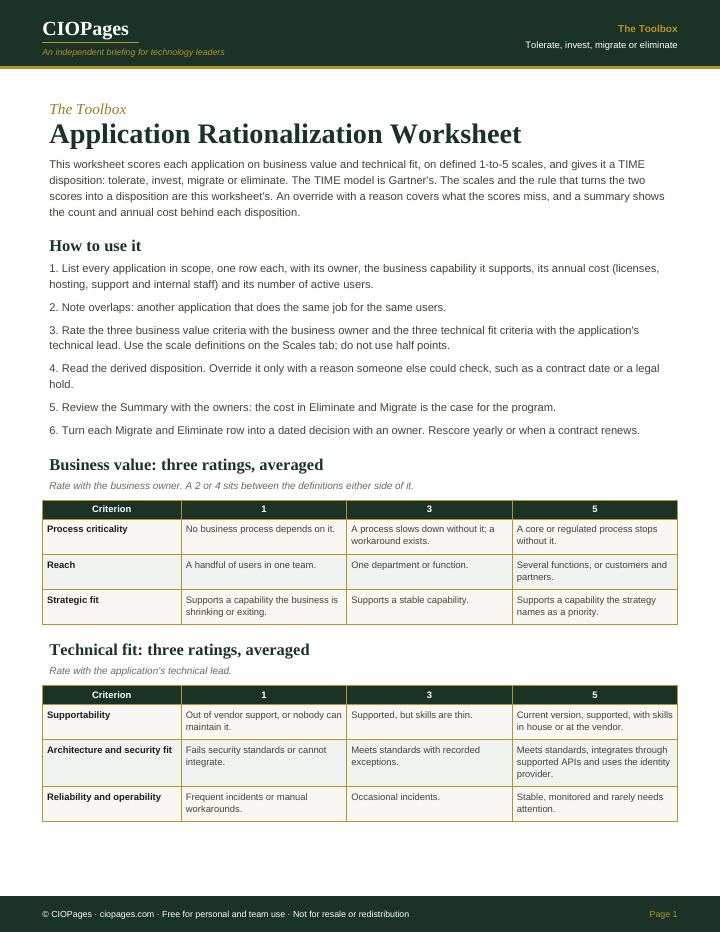
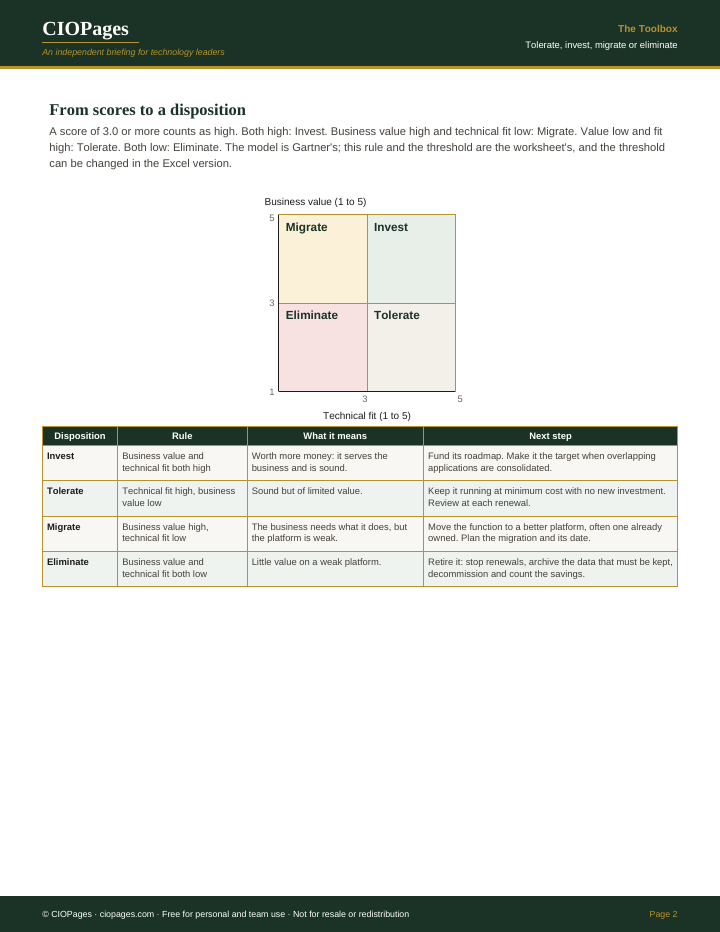
Pages 1 and 2 of 3 of the PDF. Select an image to enlarge it.
Who uses it
- CIOs and enterprise architects, to decide which applications to invest in, consolidate or retire.
- Application portfolio managers, to score the inventory consistently and track dispositions.
- Business application owners, to rate business value against defined anchors rather than by preference.
- IT finance leads, to see the annual cost behind each disposition.
When to use it
- An inventory exists, but nothing has been decided from it.
- A merger or acquisition has left two applications for the same job.
- A cost target needs savings from the application estate.
- Several applications are reaching end of vendor support at the same time.
How to use it
Score the portfolio with business and technical owners, then turn each Migrate and Eliminate row into a dated decision with an owner.
- List every application in scope with its owner, capability, annual cost and active users, and note overlaps.
- Rate the three business value criteria with the business owner and the three technical fit criteria with the technical lead, in whole points.
- Read the derived disposition; override it only with a reason someone else could check.
- Review the summary with the owners, starting with the cost marked Migrate and Eliminate.
- Turn each Migrate and Eliminate row into a dated decision with an owner.
- Rescore yearly, and whenever a contract comes up for renewal.
You leave with: A scored inventory with a TIME disposition for each application, the reasons for every override, and the annual cost and user count behind each disposition.
Where it goes wrong
- Letting each owner score only their own application, which puts nearly everything in Invest.
- Treating the Migrate and Eliminate cost as savings, before migration effort, data archiving and replacement licenses are counted.
- Using overrides without reasons, so the dispositions become the opinions the scores were meant to replace.
- Scoring once and filing the result. Dispositions change when contracts renew and platforms lose support.
Get the worksheet
It is free. Enter your work email and we send the download link.
Questions
What does TIME stand for in application rationalization?
Tolerate, invest, migrate and eliminate: the four dispositions in Gartner's TIME model. Each application gets one, based on its business value and its technical fit.
How does the worksheet decide the disposition?
Business value and technical fit are each the average of three 1-to-5 ratings. A score at or above the threshold, 3.0 by default, counts as high. Both high is Invest, value high and fit low is Migrate, value low and fit high is Tolerate, and both low is Eliminate.
When should a disposition be overridden?
When a fact the scores do not capture changes the answer, such as records Legal must keep or a contract that ends on a known date. The worksheet requires a reason for every override and counts them on the summary.